カスタムフィールド用のフォームはログインする必要があります
表示を確認する際は仮アカウントをご登録いただき、リロードいただくか以下のテスト用アカウントでお試しください。
メールアドレス/パスワード: demo@example.com / password
※モーダル表示は入力済みの項目を非表示にしています
※インライン表示は入力済みの項目も表示しています
Show Form action / multi step (Composer x id)

Cxense is proud to welcome publishers and media companies in Japan, to a seminar at the Royal Norwegian Embassy in Tokyo on May 28th.
As the first Cxense Japan event in 2013 was a great success and attended by over 80 publishers and media contacts, we have decided to host another event this year.
The seminar will provide Cxense customers and contacts in the Japanese publishing world with valuable industry updates, and serve as a networking forum for media companies.
The seminar will feature two Cxense case studies with esteemed guest speakers from DMM.com Lab and MediaGene, as well as an industry update from Cxense's founder Dr. John M. Lervik, and an update and demo of the newly launched Cxense DMP solution by its Product Manager, Mr. Jan Helge Sageflaat coming in from Oslo, Norway, for the event.
As the first Cxense Japan event in 2013 was a great success and attended by over 80 publishers and media contacts, we have decided to host another event this year.
The seminar will provide Cxense customers and contacts in the Japanese publishing world with valuable industry updates, and serve as a networking forum for media companies.
Overview - Show Form action / multi step
- 複数のステップで会員属性を行うための表示オプションになります
- 基本的な作成方法はShow Formを使った会員属性取得と同様のためそちらを先にご参照ください
- 未ログイン中ユーザにはログインモーダルが表示されるため、ターゲットオーディエンスで除外することを推奨します。
- UXの観点から、何度も表示するのではなく、ページビューメータ等を併せてご利用ください。
Procedure - Custom Fields
- Piano Composerにログインする
- [管理]=>[カスタムフィールド]メニューを開きます
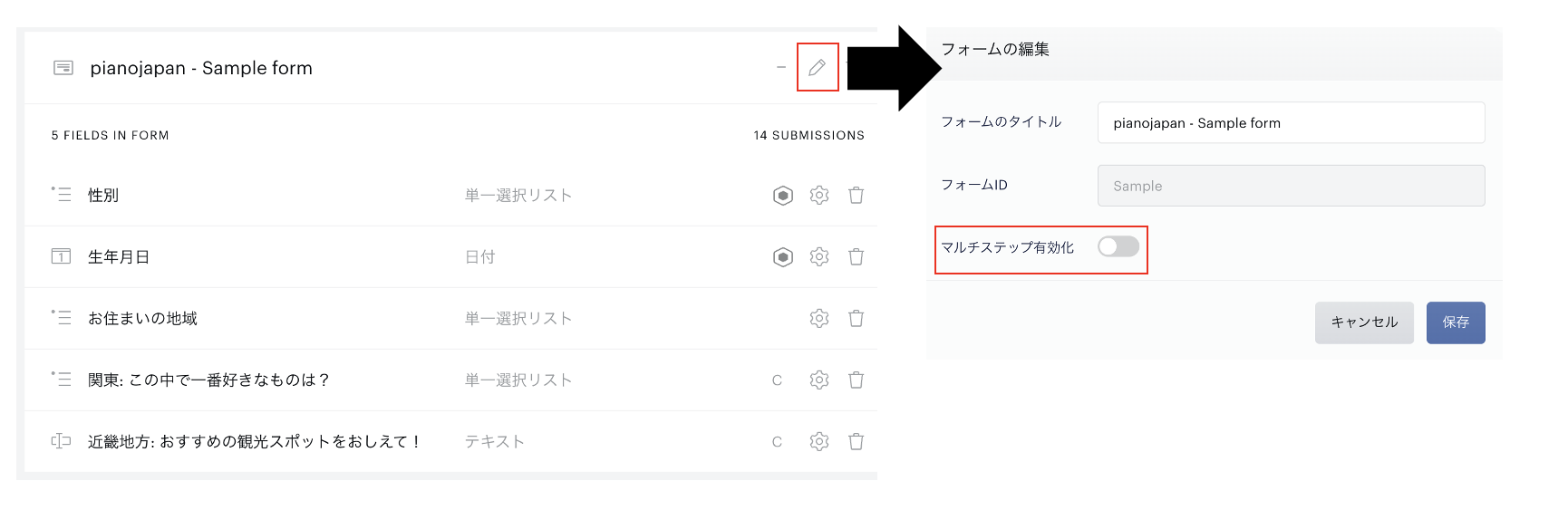
- 右側のマルチステップ化したいフォームの鉛筆マークを押下します
- 表示されたメニュー上にある、「マルチステップ有効化」トグルをオンにします
- 保存を押すことで該当フォームがマルチステップ用になります
- フォーム一覧画面に戻ると、フォームにセットされていたカスタムフィールドがStep1として設定された状態になります
- Step2以降に分けたいカスタムフィールドがあればドラッグ&ドロップして移動させてください
- マルチステップを無効にした場合はフォームにあるすべてのカスタムフィールドが1つにまとまった状態に戻ります