Survey step-by-step (Composer x DMP)
Cxense is proud to welcome publishers and media companies in Japan, to a seminar at the Royal Norwegian Embassy in Tokyo on May 28th.
As the first Cxense Japan event in 2013 was a great success and attended by over 80 publishers and media contacts, we have decided to host another event this year.
The seminar will provide Cxense customers and contacts in the Japanese publishing world with valuable industry updates, and serve as a networking forum for media companies.
The seminar will feature two Cxense case studies with esteemed guest speakers from DMM.com Lab and MediaGene, as well as an industry update from Cxense's founder Dr. John M. Lervik, and an update and demo of the newly launched Cxense DMP solution by its Product Manager, Mr. Jan Helge Sageflaat coming in from Oslo, Norway, for the event.
As the first Cxense Japan event in 2013 was a great success and attended by over 80 publishers and media contacts, we have decided to host another event this year.
The seminar will provide Cxense customers and contacts in the Japanese publishing world with valuable industry updates, and serve as a networking forum for media companies.
本テンプレートをご利用の際の注意点
- Piano DMP/Composerをご契約されているお客様のみご利用いただけます。
- 会員に対して設定できる1stパーティデータではなくDMPイベントとして取得するため、アノニマスユーザに対してもご利用いただけます。
- DMPの拡張セグメントに使う目的で本アンケートをご利用される場合、回答内容によっては拡張をお断りさせていただくケースもございます。予めご了承ください。(選択肢が多すぎる場合や、ユーザのサイト上での行動に差がないと思われるケースなど)
- 半角記号は除去した形で計測いたします。(除去例: [A]回答1 -> A回答1)
- 本テンプレートで必要となる、/dmp/push API用のpersistedQueryIdとカスタマープレフィックスを事前にご用意した上で作成をお願いします。persistedQueryIdについてはほとんどのお客様環境ですでに用意されていますので、不明の場合はご連絡ください。
- 本ページでは表示制御をしておらず、表示済み・回答済みに関わらずアンケートが表示されるようにしてあります。Cookieによる表示制御をしたい場合は こちら をご参照ください。
Procedure - Template
- Piano Composerにログインする
- [管理]タブメニューのテンプレートから「テンプレートを追加」をクリックする
- テンプレート名を任意に入力し、ユースケースを「ニュースレター」に設定し「ライブラリへ追加」をクリックする
- 作成したテンプレートを開き、「コンテンツフィールド」をクリックする
- コンテンツフィールドの入力項目設定を以下の Render Template Settings の通りに作成し、到達URLや画像URLなどの値はカスタマイズする
- 設問を複数用意する場合は、コンテンツフィールド編集の際に、設問用フィールドを設問数分増やす。
- 同様に「コードを編集」をクリックし、Render Template HTML と Render Template CSS のコードをコピーしてペーストする(CSS/HTML上での位置調整用の修正等は適宜行ってください)
- コードを編集する際に、複数設問がある場合は、HTMLコード中の”scope.questions”変数の要素を設問数分増やす。(編集例参照)
- 「保存」をクリックする
Procedure - Experience
- Piano Composerにログインする
- 新規サイトエクスペリエンス、もしくは既存のエクスペリエンスの編集画面に入る
- 任意の対象ページ、ターゲットオーディエンス、イベント/トリガーを定義する
- アクションで「JSを実行」を選択し、以下の Experience Settings (RunJS) をコピーしてペーストする
- 同様にアクションで「JSを実行」を選択し、以下のCallback用JavaScript Experience Settings (RunJS/Callback) をコピーしてペーストする
- アクションの「テンプレートを表示」をドラッグし、上記で作成したRun JSの下にドロップする
- 表示設定を以下のように設定する。
- タイプ:ページ上のインライン
- コンテナのセレクター:#piano_inline
- 「保存」をクリックする
Render Template Settings (コンテンツフィールド)
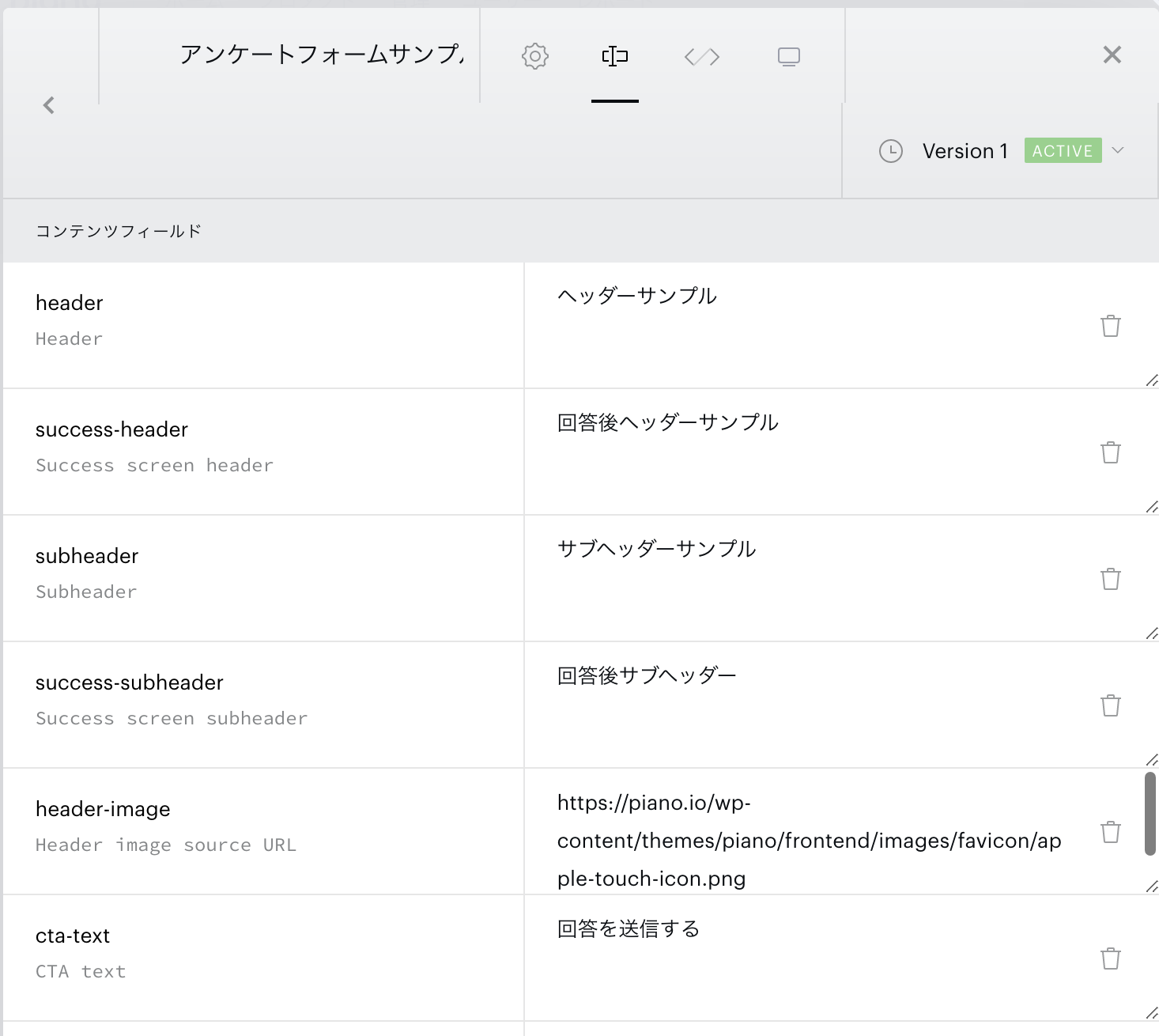
| コンテンツフィールド名 | 内容 | 設定例 |
|---|---|---|
| header | アンケートタイトル | 編集部からのアンケートに<br>ご協力お願いします |
| subheader | アンケートタイトル下 | プライバシーポリシーを確認する |
| subheader-link | プライバシーポリシー等へのリンク | https://piano.io/ |
| header-image | ウィジェット左上の画像/企業ロゴ等をURL指定 | - |
| cta-text | 送信ボタンのテキスト | 回答を送信する |
| header-text-color | headerのテキスト配色 | #323232 |
| subheader-text-color | subheaderのテキスト配色 | rgba(50, 50, 50, 0.7) |
| input-box-text-color | input | |
| cta-text-color | 送信ボタンのテキスト配色 | #ffffff |
| background-color | ウィジェットの背景色 | #ffffff |
| question_id1 | 設問のID。パフォーマンスパラメータのグループ名になります。(数字は複数設問の場合、適宜増やしてください) | householdincome |
| question_text1 | 設問の内容。パフォーマンスパラメータの値になります。(数字は複数設問の場合、適宜増やしてください) | Q1: 世帯年収 |
| question_type1 | 設問の入力方法を指定してください。(数字は複数設問の場合、適宜増やしてください) | text/radio/select |
| answer_choices1 | 設問が選択式の場合の選択肢一覧です。カンマ区切りで指定してください。(数字は複数設問の場合、適宜増やしてください) | 〜300万円未満,300万円〜500万円未満,500万円〜700万円未満,700万円以上 |
| footer_note | 設問下のテキスト。 | 回答結果は記事執筆の参考にさせて頂きます。 |
Render Template HTML
<config close-button-type="boilerplate"></config>
<div class="pn-boilerplate pn-boilerplate--newsletter">  <div hide-if-blank class="pn-boilerplate__header">    <button ng-if="isShowBoilerplateCloseButton()" class="pn-boilerplate__close unbutton" type="button" ng-click="close()" external-event="offer-close-modal">      <span class="visually-hidden"><t>Close</t></span>      <span class="up"></span>      <span class="down"></span>      <!--<svg class="pn-boilerplate__close-icon" width="12" height="12" viewBox="0 0 12 12" fill="none" xmlns="http://www.w3.org/2000/svg">          <path fill-rule="evenodd" clip-rule="evenodd" d="M4.586 6L.293 1.707 1.707.293 6 4.586 10.293.293l1.414 1.414L7.414 6l4.293 4.293-1.414 1.414L6 7.414l-4.293 4.293-1.414-1.414L4.586 6z" fill="#0F0F15"/>      </svg>-->    </button>  </div>
  <signup-screen class="pn-boilerplate__body pn-boilerplate__body--initial-screen">    <img class="header-image" src="[%% header-image %%]"/>    <b class="pn-boilerplate__accent"><t>[%% header %%]</t></b>    <p class="pn-boilerplate__text pn-boilerplate__text--subheader"><a href="[%% subheader_link %%]" target="_blank"><t>[%% subheader %%]</t></a></p>    <form class="pn-boilerplate__form" id="pn-survey" action="post">      <div class="pn-boilerplate__input-group" newsletter-signup-invalid="pn-boilerplate__input-group--error">        <ng-container ng-repeat="q in questions">          <div class="pn-survey-group{{$index !== 0 ? ' hide-question' : ''}}">            <div class="pn-survey-question">              <label>{{q.question}}</label>            </div>            <div class="pn-survey-answer" ng-switch="q.type">              <ng-container ng-switch-when="text">                <textarea ng-model="result[q.id]" maxlength="250" value=""></textarea>              </ng-container>              <ng-container ng-switch-when="radio">                <label name="{{q.id}}" ng-repeat="answer in q.answers" class="pianoj-survey-radio">                  <input ng-model="result[q.id]" type="{{q.type}}" value="{{answer}}">{{answer}}                </label>              </ng-container>              <ng-container ng-switch-when="select">                <select name="{{q.id}}" ng-model="result[q.id]" class="pianoj-survey-select">                  <option ng-repeat="answer in q.answers" value="{{answer}}">{{answer}}</option>                </select>              </ng-container>            </div>          </div>        </ng-container>      </div>      <button class="pn-boilerplate__button unbutton"              id="pn-next"              type="button"              onclick="step()"><t>次の質問へ進む</t></button>      <button class="pn-boilerplate__button unbutton"              id="pn-submit"              type="submit"              external-event="survey"              external-event-result="{{result}}"><t>[%% cta-text %%]</t></button>    </form>    <p class="pn-boilerplate__text pn-boilerplate__text--footer"><t>[%% footer_note %%]</t></p>  </signup-screen>
  <div custom-script>    var scope = angular.element("#pn-survey").scope();    console.log(scope);    scope.questions = [      {id: "[%% question_id1 %%]", type: "[%% question_type1 %%]", question: "[%% question_text1 %%]", answers: "[%% answer_choices1 %%]".split(",")}    ];    scope.result = {};    function log() {    }
    function step() {      var pianoCurrentQuestionNumber = -1;      var nextQ = false;      var questions = document.querySelectorAll('.pn-survey-group');      for (var i=0; i < questions.length; i++) {        var questionEl = questions[i];        // 表示中のQuestionを非表示        if (questionEl.className === "pn-survey-group") {          questionEl.setAttribute("class", "pn-survey-group hide-question");          pianoCurrentQuestionNumber = i;          nextQ = true;        } else if (nextQ) {          // 直前のQが回答済みの場合は次の質問を表示する          questionEl.setAttribute("class", "pn-survey-group");          nextQ = false;        } else {          questionEl.setAttribute("class", "pn-survey-group hide-question");        }        if (pianoCurrentQuestionNumber + 2 === questions.length) {          document.querySelector("#pn-submit").style.display = "inline-block";          document.querySelector("#pn-next").style.display = "none";        }      }    }  </div>
</div>
設問数を増やす場合の変数編集例
scope.questions = [ {id: "[%% question_id1 %%]", type: "[%% question_type1 %%]", question: "[%% question_text1 %%]", answers: "[%% answer_choices1 %%]".split(",")} ]; ↓ scope.questions = [ {id: "[%% question_id1 %%]", type: "[%% question_type1 %%]", question: "[%% question_text1 %%]", answers: "[%% answer_choices1 %%]".split(",")}, {id: "[%% question_id2 %%]", type: "[%% question_type2 %%]", question: "[%% question_text2 %%]", answers: "[%% answer_choices2 %%]".split(",")} ];Render Template CSS
/* scaffolding *//* scaffolding */#pn-submit {  display: none;}
.visually-hidden {    position: absolute;    width: 1px;    height: 1px;    margin: -1px;    border: 0;    padding: 0;    white-space: nowrap;    -webkit-clip-path: inset(100%);    clip-path: inset(100%);    clip: rect(0 0 0 0);    overflow: hidden;}
.hide-question {  display: none;}
textarea {  height: 102px;  width: 100%;}
.unbutton {    margin: 0;    padding: 0;    color: inherit;    text-decoration: none;    background-color: rgba(0, 0, 0, 0);    -webkit-box-shadow: none;    box-shadow: none;    text-shadow: none;    outline: 0;    border: 0;}
p {    margin: 0;}
img,svg {    display: block;    max-width: 100%;    height: auto;}
svg {    margin: 0 auto;}
b {    display: block;    font-weight: normal;}
a,button {    -webkit-tap-highlight-color: rgba(0, 0, 0, 0);}
* {    -webkit-box-sizing: border-box;    box-sizing: border-box;}
/* general style */
.pn-boilerplate {    width: 100%;    font-family: "Roboto", "Helvetica", sans-serif;    font-weight: 500;    font-size: 14px;    line-height: 24px;    letter-spacing: 0.01em;    color: rgba(50, 50, 50, 0.8);    -webkit-font-smoothing: antialiased;    text-align: center;    background-color: [%% background-color %%];    border: 1px solid rgba(50, 50, 50, 0.08);}
.pn-boilerplate__header {    position: relative;    -webkit-box-sizing: border-box;    box-sizing: border-box;    display: -webkit-box;    display: -ms-flexbox;    display: flex;    -webkit-box-orient: horizontal;    -webkit-box-direction: normal;    -ms-flex-direction: row;    flex-direction: row;    -webkit-box-align: center;    -ms-flex-align: center;    align-items: center;    -webkit-box-pack: start;    -ms-flex-pack: start;    justify-content: flex-start;    height: 64px;    border-bottom: 1px solid rgba(50, 50, 50, 0.08);    z-index: 100;}
.pn-boilerplate__close {    width: 45px;    height: 100%;    margin-left: auto;    border-left: 1px solid rgba(50, 50, 50, 0.08);    cursor: pointer;}
.pn-boilerplate__close-icon {    display: inline-block;    vertical-align: middle;    fill-opacity: 0.3;    -webkit-transition: fill-opacity 0.1s linear;    transition: fill-opacity 0.1s linear;}
.pn-boilerplate__close:hover .pn-boilerplate__close-icon,.pn-boilerplate__close:focus .pn-boilerplate__close-icon {    fill-opacity: 1;}
.pn-boilerplate__body {    display: block;    padding: 62px 72px 56px;}
.pn-boilerplate__body--initial-screen {    padding: 47px 24px 24px;}
.pn-boilerplate__body--success-screen {    padding: 44px 24px 42px;}
.pn-boilerplate__pic {    display: inline-block;    vertical-align: top;    margin-bottom: 36px;}
.pn-boilerplate__accent {    margin-bottom: 8px;    font-size: 18px;    line-height: 28px;    font-weight: 400;    color: [%% header-text-color %%];}
.pn-boilerplate--newsletter .pn-boilerplate__accent {    margin-bottom: 6px;}
.pn-boilerplate__text {    font-size: 14px;    line-height: 24px;    color: [%% subheader-text-color %%];}
.pn-boilerplate--newsletter .pn-boilerplate__text--subheader {    #max-width: 300px;    margin: auto;    font-weight: 400;}
.pn-boilerplate__form {    #display: -webkit-box;    #display: -ms-flexbox;    #display: flex;    -webkit-box-pack: justify;    -ms-flex-pack: justify;    justify-content: space-between;    max-width: 516px;    margin: 20px auto 20px;}
.pn-boilerplate__input-group {    position: relative;    -ms-flex-preferred-size: auto;    flex-basis: auto;    width: 100%;    -webkit-box-flex: 1;    -ms-flex-positive: 1;    #flex-grow: 1;    margin-right: 24px;    text-align: left;}
.pn-boilerplate__input-group::after {    #content: "";    #position: absolute;    #top: 0;    #left: 0;    #display: block;    #width: 48px;    #height: 100%;    #background-image: url("data:image/svg+xml,%3Csvg width='14' height='10' fill='none' xmlns='http://www.w3.org/2000/svg'%3E%3Cpath fill-rule='evenodd' clip-rule='evenodd' d='M12.099 1H1.9L7 4.4 12.099 1zM1 1.6V9h12V1.6L7.277 5.417 7 5.601l-.277-.185L1 1.601zM0 0h14v10H0V0z' fill='rgb(50,50,50)'/%3E%3C/svg%3E");    #background-repeat: no-repeat;    #background-position: 17px center;    #background-size: 14px 10px;    #pointer-events: none;}
input.pn-boilerplate__input {    width: 100%;    height: 48px;    padding: 6px 12px;    font-family: inherit;    font-size: 14px;    line-height: 24px;    color: [%% input-box-text-color %%];    border: 1px solid rgba(54, 54, 54, 0.1);    border-radius: 0;    text-overflow: ellipsis;    -webkit-appearance: none;}
.pn-boilerplate__input:hover,.pn-boilerplate__input:focus {    outline: 0;    -webkit-box-shadow: none;    box-shadow: none;}
.pn-boilerplate__input-group--error .pn-boilerplate__input {    padding-right: 48px;    border-color: #f23d3d;}
.pn-boilerplate__input::-webkit-input-placeholder {    font-family: inherit;    color: rgba(54, 54, 54, 0.4);}
.pn-boilerplate__input::-moz-placeholder {    font-family: inherit;    color: rgba(54, 54, 54, 0.4);}
.pn-boilerplate__input:-ms-input-placeholder {    font-family: inherit;    color: rgba(54, 54, 54, 0.4);}
input.pn-boilerplate__input--email {    padding-left: 48px;    /*background-image: url("data:image/svg+xml,%3Csvg width='14' height='10' fill='none' xmlns='http://www.w3.org/2000/svg'%3E%3Cpath fill-rule='evenodd' clip-rule='evenodd' d='M12.099 1H1.9L7 4.4 12.099 1zM1 1.6V9h12V1.6L7.277 5.417 7 5.601l-.277-.185L1 1.601zM0 0h14v10H0V0z' fill='rgb(50,50,50)'/%3E%3C/svg%3E");*/    /*background-repeat: no-repeat;*/    /*background-position: 17px center;*/    /*background-size: 14px 10px;*/}
.pn-boilerplate__error-indicator {    position: absolute;    top: 0;    right: 16px;    display: none;    bottom: 0;    width: 16px;    height: 16px;    margin: auto;    background-image: url("data:image/svg+xml,%3Csvg xmlns='http://www.w3.org/2000/svg' width='16' height='16' fill='none'%3E%3Ccircle cx='8' cy='8' r='7.5' stroke='rgb(242,61,61)'/%3E%3Cpath d='M8.5 5h-1v4h1V5zm0 5h-1v1h1v-1z' clip-rule='evenodd' fill='rgb(242,61,61)' fill-rule='evenodd'/%3E%3C/svg%3E ");    background-repeat: no-repeat;    background-position: center;    background-size: contain;}
.pn-boilerplate__input-group--error .pn-boilerplate__error-indicator {    display: block;}
.pn-boilerplate__error-message {    position: absolute;    bottom: calc(100% + 10px);    right: -10px;    display: none;    min-width: 240px;    padding: 12px;    font-size: 12px;    line-height: 18px;    letter-spacing: 0.01em;    color: #ffffff;    text-align: center;    background-color: #ed2939;    -webkit-box-shadow: 0 15px 40px rgba(54, 54, 54, 0.2);    box-shadow: 0 15px 40px rgba(54, 54, 54, 0.2);}
.pn-boilerplate__error-message::after {    content: "";    position: absolute;    bottom: -4px;    right: 14px;    width: 8px;    height: 8px;    background-color: inherit;    -webkit-transform: rotate(45deg);    -ms-transform: rotate(45deg);    transform: rotate(45deg);}
.pn-boilerplate__error-indicator:hover .pn-boilerplate__error-message {    display: block;}
.pn-boilerplate__button {    min-width: 204px;    padding: 13px 18px 11px;    font-family: "Roboto", "Helvetica", sans-serif;    font-size: 11px;    line-height: 24px;    font-weight: 500;    letter-spacing: 0.14em;    color: [%% cta-text-color %%];    text-transform: uppercase;    background-color: [%% button-color %%];    cursor: pointer;}
.pn-boilerplate--newsletter .pn-boilerplate__button {    min-width: 144px;}
.pn-boilerplate__button::after {    content: "";    display: inline-block;    width: 0;    height: 9px;    margin-left: 0;    background-image: url('data:image/svg+xml,%3Csvg width=\'12\' height=\'9\' viewBox=\'0 0 12 9\' fill=\'none\' xmlns=\'http://www.w3.org/2000/svg\'%3E%3Cpath d=\'M7.5 0l-.7.7L10.1 4H0v1h10.1L6.8 8.3l.7.7 4.3-4.3.2-.2-.2-.2L7.5 0z\' fill=\'rgb(255, 255, 255)\'/%3E%3C/svg%3E');    background-repeat: no-repeat;    background-position: center;    background-size: contain;    -webkit-transition: all 0.2s linear;    transition: all 0.2s linear;    -webkit-transform: translateX(-30px);    -ms-transform: translateX(-30px);    transform: translateX(-30px);}
.pn-boilerplate__button:hover::after,.pn-boilerplate__button:focus::after {    width: 12px;    margin-left: 13px;    -webkit-transform: translateX(0);    -ms-transform: translateX(0);    transform: translateX(0);}
.pn-boilerplate--subscription .pn-boilerplate__button {    margin: 45px 0 31px;}
@media (max-width: 564px) {    .pn-boilerplate {        width: 100%;    }}
@media (max-width: 480px) {    .pn-boilerplate__body,    .pn-boilerplate--subscription .pn-boilerplate__body {        padding-left: 24px;        padding-right: 24px;    }
    .pn-boilerplate__form {        -webkit-box-orient: vertical;        -webkit-box-direction: normal;        -ms-flex-direction: column;        flex-direction: column;    }
    .pn-boilerplate__input-group {        width: 100%;        margin-right: 0;        margin-bottom: 24px;    }
    .pn-boilerplate__button {        width: 100%;    }}
.pn-boilerplate__account {    margin-left: auto;}
.pn-survey-answer {  margin-top: 10px;}.pn-survey-submit {  margin-top: 10px;  text-align: center;}.pn-description {  font-size: smaller;}
.pn-boilerplate__close{  border-top:0;    border-left: 0px;    position: absolute;    top: 15px;    right: 15px;    opacity: 0.4;  height:100%;}.pn-boilerplate__close-icon path{  fill:#333;}.pn-boilerplate__header{  height:0px;}.pn-boilerplate__close-icon{  opacity:1;  fill-opacity:1;}.pn-boilerplate__body--initial-screen{  padding:15px;  box-shadow: 1px 4px 4px 5px rgb(0 0 0 / 15%);}.pn-survey-grou{  color:#333;}.header-image{    width: 50px;    height: 50px;    margin-bottom: 20px;}.pn-boilerplate__accent .ng-scope{    font-size: 18px;    font-weight: bold;}.pn-boilerplate--newsletter .pn-boilerplate__text--subheader .ng-scope{    font-size: 14px;}.pn-survey-question .ng-binding{    border-bottom: 1px solid #333;    line-height: 1.4;    padding-bottom: 5px;}select.pianoj-survey-select {  width: 100%;}label.pianoj-survey-radio{    user-select: none;    padding: 10px 0;    border-bottom: 1px solid #ccc;    display:-webkit-box;    display:-webkit-flex;    display:-ms-flexbox;    display:flex;    -webkit-box-align:center;    -webkit-align-items:center;    -ms-flex-align:center;    align-items:center;}input.ng-valid{    margin-right: 8px;}.pn-boilerplate__button{    background-color: #035785;    cursor: pointer;    box-shadow: 0px 6px 0px 0 #033856;    padding:11px}.pn-boilerplate__text .ng-scope{    font-size: 12px;}.pn-boilerplate__input-group{  margin-bottom:10px;  margin-top:0px;}.pn-boilerplate__form form{  margin-bottom:15px;}.pn-boilerplate__close{  right:0}.pn-boilerplate__button{  font-size:14px}.no-js body{  background: rgba(0, 0, 255, 0);}  .pn-boilerplate__body--initial-screen{  background: #ffffff;  }  .pn-boilerplate{    width: 90%;    margin: auto;  }.pn-boilerplate{    border: 2px solid #e6e6e6;}.pn-survey-answer{      margin-top: 3px;}.tp-iframe-wrapper{  margin-top:20px;  margin-bottom:-50px;}button.pn-boilerplate__close span{  position: absolute;  left: 5px;  width: 36px;  height: 2px;  border-radius: 3px;}.up{transform: rotate(45deg);    top: 13px;    background-color: #676767;    z-index: 1000;}.down{  transform: rotate(-45deg);    top: 13px;    background-color: #676767;    z-index: 1000;}
Experience Settings
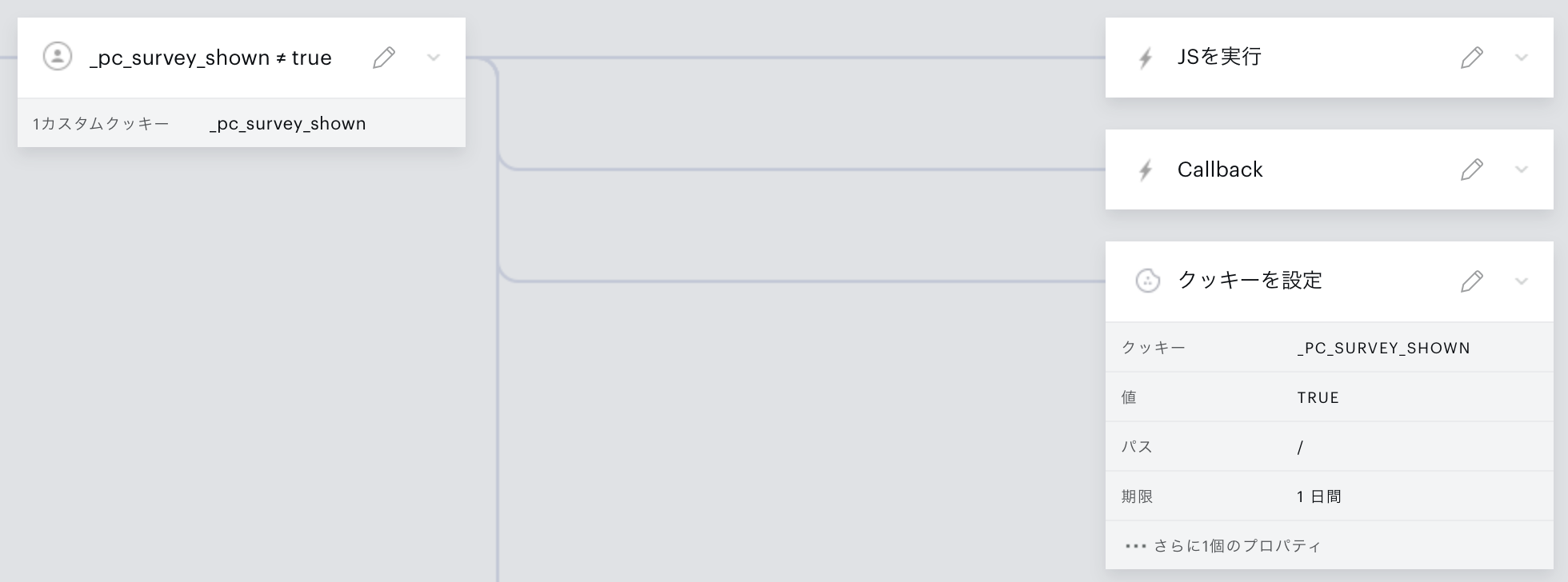
Experience Settings (RunJS) -ウィジェット差し込み用要素の追加とテンプレートの表示-
(function(){ var elid = "piano_survey"; var el = document.getElementById(elid) || document.createElement('div'); el.id = elid; el.style.position = "fixed"; el.style.bottom = "20px"; //下から20px el.style.right = "5px"; //右から20px el.style.transform = "translateY(100%)"; //初期位置 el.style.opacity = "0"; //初期透過 el.style.transition = "all 1.5s"; el.style["z-index"] = "9999"; el.style.width = "385px"; if(!document.getElementById(elid)) { document.body.insertAdjacentElement("beforeend", el); } var piano_inline = document.createElement('div'); piano_inline.id = "piano_inline"; el.appendChild(piano_inline); tp = window.tp || []; tp.push(["addHandler", "showTemplate", function(template) { if(template.containerSelector = "#" + elid) { setTimeout(function() { el.style.transform = "translate3d(0,0,0)"; el.style.opacity = "1"; }, 1500); } }]); tp.template.show({templateId:'/*テンプレートIDは作成したものをセットしてください*/', displayMode:'inline', containerSelector:'#piano_inline', trackingId: context.trackingId});})();Experience Settings (RunJS/Callback)
function sendSurveyEvent(event) { try { if(typeof event.params.result != 'undefined') { var result = JSON.parse(event.params.result); var prefix = "/* お客様に割り振られたカスタマープレフィックスを指定してください */"; var pid = "/* /dmp/push用のpersistedQueryIdを指定してください */"; if(result) { cX.setEventAttributes({origin: prefix + "-web", persistedQueryId: pid}); for(var key in result) { result[key] = result[key].replace(/\W/g, function(m){return m.match(/[!-~]|\s/) ? "" : m}).slice(0, 250); } cX.sendEvent("survey", result); } } } catch (e) { console.log(e); }}function setCookie(cname, cvalue, exdays) { var d = new Date(); d.setTime(d.getTime() + (exdays*24*60*60*1000)); var expires = "expires="+ d.toUTCString(); document.cookie = cname + "=" + cvalue + ";" + expires + ";path=/";}function onCheckoutExternalEvent(event) { console.log(event.eventName); switch (event.eventName) { case 'survey': sendSurveyEvent(event); // don't break here case 'offer-close-modal': setCookie("_pc_survey_closed", "true", 14); break; } if (event.eventName === 'survey' || event.eventName === 'offer-close-modal') { var elid = "piano_survey"; var el = document.getElementById(elid) || document.createElement('div'); el.style.display = "none"; }}tp.push(["addHandler", "checkoutCustomEvent", onCheckoutExternalEvent]);Experience Settings(Cookie)
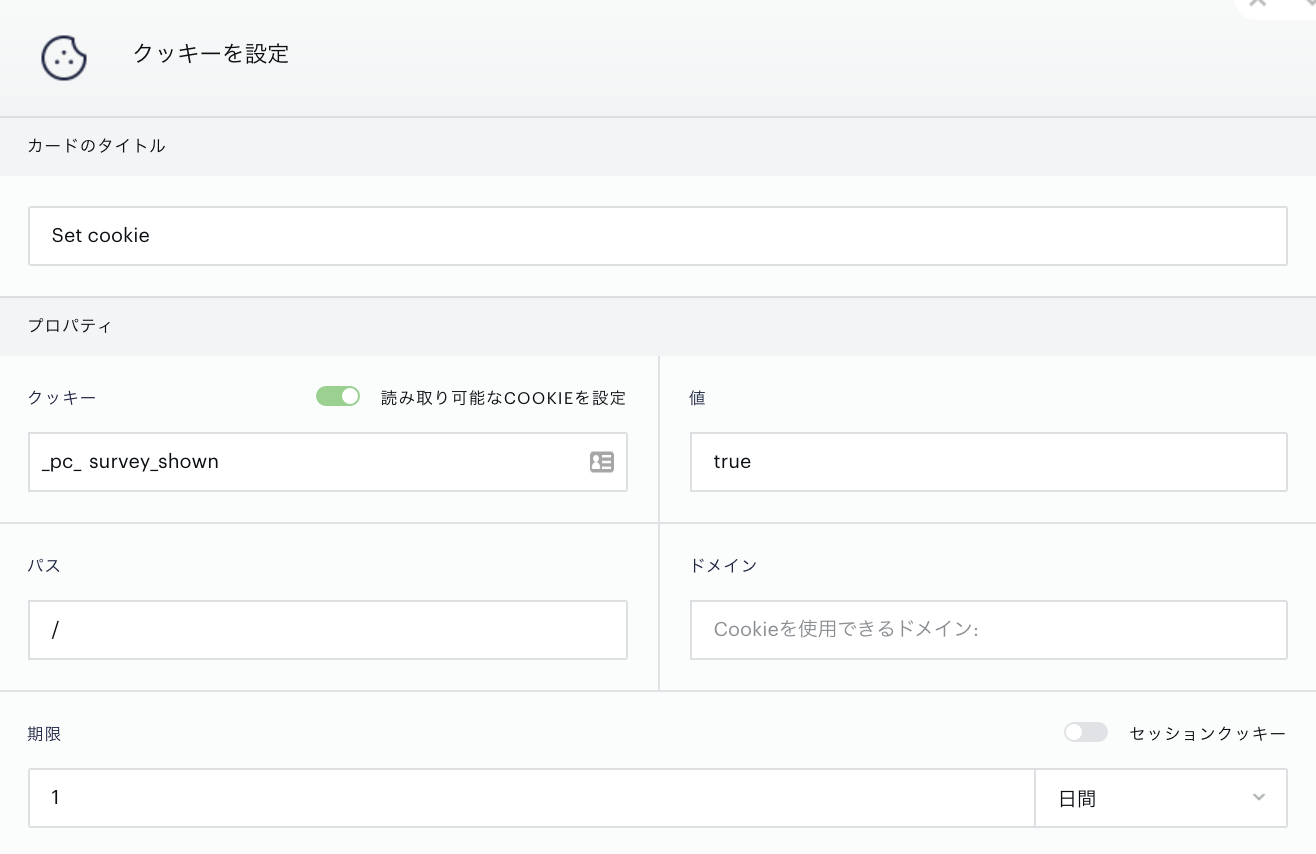
Cookieを使った表示制御に関して
| Cookie名 | 内容 | 利用例 |
|---|---|---|
| _pc_survey_shown | エクスペリエンス作成の際に「クッキーを設定」にてセットする値です。実装例では、アンケートを表示した際に期限1日でセットしています。 | オーディエンス条件で、_pc_survey_shown=trueのユーザを対象オーディエンスから除外する、など |
| _pc_survey_closed | エクスペリエンス作成の際に、Callbackとして設定された処理の中でセットする値です。実装例では、アンケートのクローズボタンを押したユーザに期限14日でセットしています。 | オーディエンス条件で、_pc_survey_shown=trueのユーザを対象オーディエンスから除外する、など |
| (追加例) pc_survey[アンケートタイトル] | 回答済みユーザに対して表示制御をするためのCookie追加案です。Callbackの中の「case ‘survey’」の処理の中で、_pc_survey_closedと同様にsetCookie関数を使ってセットします。 | オーディエンス条件で、pc_survey[アンケートタイトル]=trueのユーザを対象オーディエンスから除外する、など。 名称例: _pc_survey_enc202104 |