Popup Template (Composer)
Cxense is proud to welcome publishers and media companies in Japan, to a seminar at the Royal Norwegian Embassy in Tokyo on May 28th.
As the first Cxense Japan event in 2013 was a great success and attended by over 80 publishers and media contacts, we have decided to host another event this year.
The seminar will provide Cxense customers and contacts in the Japanese publishing world with valuable industry updates, and serve as a networking forum for media companies.
The seminar will feature two Cxense case studies with esteemed guest speakers from DMM.com Lab and MediaGene, as well as an industry update from Cxense's founder Dr. John M. Lervik, and an update and demo of the newly launched Cxense DMP solution by its Product Manager, Mr. Jan Helge Sageflaat coming in from Oslo, Norway, for the event.
As the first Cxense Japan event in 2013 was a great success and attended by over 80 publishers and media contacts, we have decided to host another event this year.
The seminar will provide Cxense customers and contacts in the Japanese publishing world with valuable industry updates, and serve as a networking forum for media companies.
Procedure - Template
- Piano Composerにログインする
- [テンプレート]タブから「テンプレートを追加」をクリックする
- テンプレート名を任意に入力し、USE CASEを「広告ブロッカー」に設定し「追加」をクリックする
- 作成したテンプレートを開き、「Edit code」をクリックする
- 以下の Render Template HTML と Render Template CSS のコードをコピーしてペーストする
- 同様にコンテンツフィールドの入力項目設定を以下の Render Template Settings の通りに作成し、到達URLや画像URLなどの値はカスタマイズする
- 「保存」をクリックする
Procedure - Experience
- Piano Composerにログインする
- 新規サイトエクスペリエンス、もしくは既存のエクスペリエンスの編集画面に入る
- 任意の対象ページ、ターゲットオーディエンス、イベント/トリガーを定義する
- アクションで「JSを実行」を選択し、以下の Experience Settings (RunJS) をコピーしてペーストする
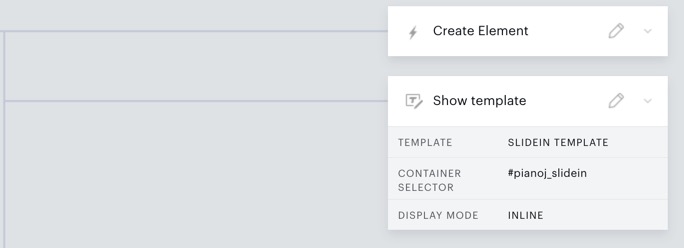
- アクションの「テンプレートを表示」をドラッグし、上記で作成したRun JSの下にドロップする
- 表示設定を以下のように設定する。
- タイプ:ページ上のインライン
- コンテナのセレクター:#pianoj_slidein
- 「保存」をクリックする
Render Template Settings (AdBlocker template)
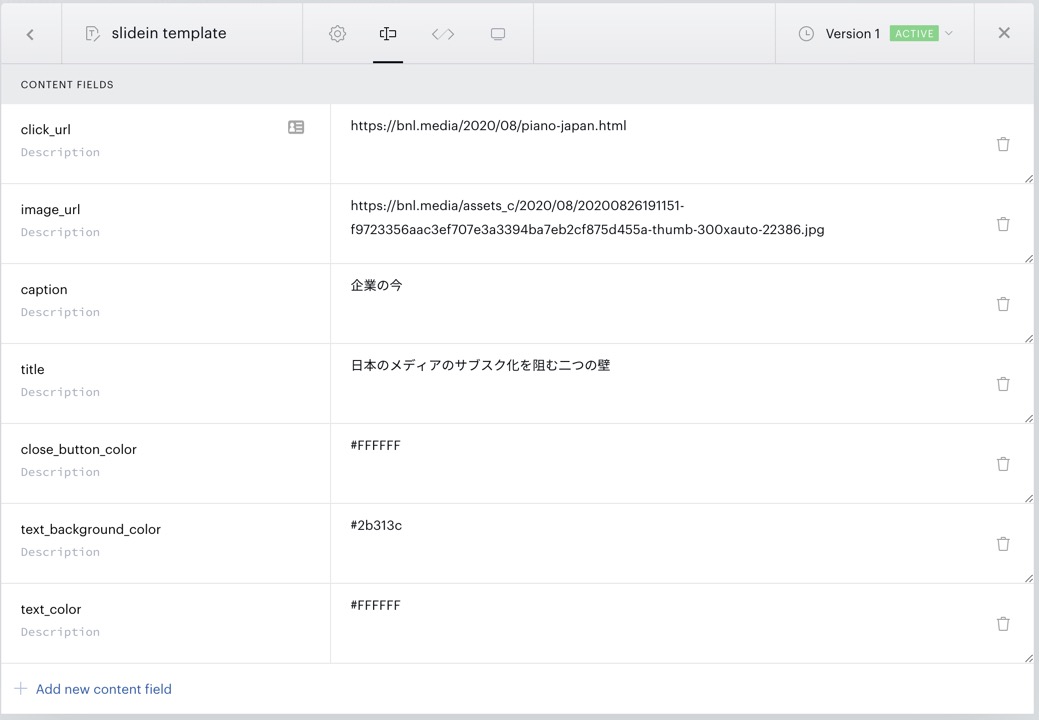
Render Template HTML
<div id="pianoj-slidein" class="pianoj-slidein"> <div class="pianoj-slidein-close" ng-click="close()"> <svg viewBox="0 0 24 24" style="fill:[%% close_button_color %%];"> <path d="M19 6.41l-1.41-1.41-5.59 5.59-5.59-5.59-1.41 1.41 5.59 5.59-5.59 5.59 1.41 1.41 5.59-5.59 5.59 5.59 1.41-1.41-5.59-5.59z"></path> <path d="M0 0h24v24h-24z" fill="none"></path> </svg> </div> <div class="pianoj-slidein-inner"> <img class="pianoj-slidein-image" src="[%% image_url %%]" alt=""> <div class="pianoj-slidein-text-wrap" style="background-color:[%% text_background_color %%];"> <div class="pianoj-slidein-text-inner"> <div class="pianoj-slidein-caption" style="color:[%% text_color %%];">[%% caption %%]</div> <div class="pianoj-slidein-title" style="color:[%% text_color %%];">[%% title %%]</div> </div> </div> <a class="pianoj-slidein-link" href="[%% click_url %%]" target="[%% target %%]" external-event="banner_click"></a> </div></div><custom-script> (function(f) { "loading" === document.readyState ? window.addEventListener("load", f, false) : f(); }(function() { window.parent.postMessage({eventName:"rendering_finish"}, '*'); }));</custom-script>Render Template CSS
#pianoj-slidein { width: 100%; max-width: 100%;}#pianoj-slidein a, #pianoj-slidein a:visited{ text-decoration: none;}.pianoj-slidein-inner { overflow: hidden; position: relative; display: block; z-index: 2;}.pianoj-slidein-image { max-width: 100%;}.pianoj-slidein-text-wrap { position: relative; max-width: 94.73%; margin-top: -10px;}.pianoj-slidein-text-inner { padding: 0.6em;}.pianoj-slidein-caption { text-decoration: underline; font-size: 0.8em;}.pianoj-slidein-title { font-size: 1em; line-height: 1.2em;}.pianoj-slidein-link { position: absolute; top: 0; left: 0; width: 100%; height: 100%; cursor: pointer; z-index: 3;}.pianoj-slidein-close { position: absolute; top: 0px; right: 0px; padding: 0.4rem; transition: all 0.5s cubic-bezier(0.23, 1, 0.32, 1); cursor: pointer; z-index: 4;}.pianoj-slidein-close:hover { transform: scale(1.4,1.4);}.pianoj-slidein-close svg{ width: 2.5em; pointer-events: none; vertical-align: top;}Experience Settings
Experience Settings (RunJS)
(() => {  const elid = "pianoj_slidein";  const el = document.getElementById(elid) || document.createElement('div');  el.id = elid;  el.style.position = "fixed";  el.style.bottom = "10px"; //下から10px  el.style.right = "10px"; //右から10px  el.style.transform = "translateY(100%)"; //初期位置  el.style.opacity = "0"; //初期透過  el.style.transition = "transform 1.5s, opacity 1.5s";  el.style["box-shadow"] = "4px 4px 20px 5px rgba(0,0,0,0.4)";  el.style["z-index"] = "9999";  if(!document.getElementById(elid)) {    document.body.insertAdjacentElement("beforeend", el);  }
  // for responsive (breakpoint, {mobile: width, desktop: width}, element)  ((breakpoint, widthSet, el) => {    const mql = window.matchMedia(`(min-width: ${breakpoint})`)    const setWidth = (e) => el.style.width = e.matches ? widthSet.desktop : widthSet.mobile;    mql.addEventListener("change", setWidth);    setWidth(mql);  })("769px", {desktop: "300px", mobile: "200px"}, el);
  // To synchronize the end of widget drawing  window.addEventListener("message", (ev) => {    if (ev.data.eventName == "rendering_finish") {      el.style.transform = "translate3d(0,0,0)";      el.style.opacity = "1";    }  });  // for closing  tp.push(["addHandler", "checkoutClose", () => el.style.visibility = "hidden"]);})();
----- 表示位置を変える場合 ----- el.style.bottom = "10px"; //下から10px el.style.right = "10px"; //右から10pxの部分を以下のように変更
左下 el.style.bottom = "10px"; //下から10px el.style.left = "10px"; //左から10px右上 el.style.top = "10px"; //上から10px el.style.right = "10px"; //右から10px
----- スライドイン動作を変える場合 ----- el.style.transform = "translateY(100%)"; //初期位置の部分を以下のように変更
右から el.style.transform = "translateX(100%)"; //初期位置左から el.style.transform = "translateX(-100%)"; //初期位置上から el.style.transform = "translateY(-100%)"; //初期位置